⚡ Fast Delivery | Vector Files Ready to Use


Hamburger SV 2026-2027 Away Font & Numbers Download (TTF, OTF, Vector)
$5.00
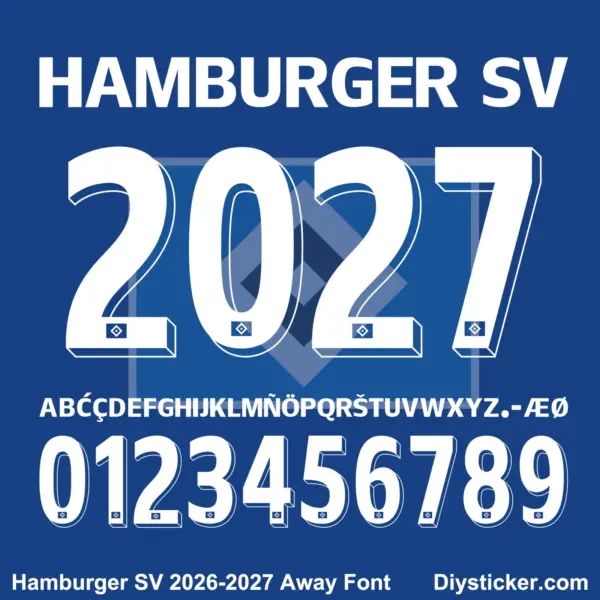
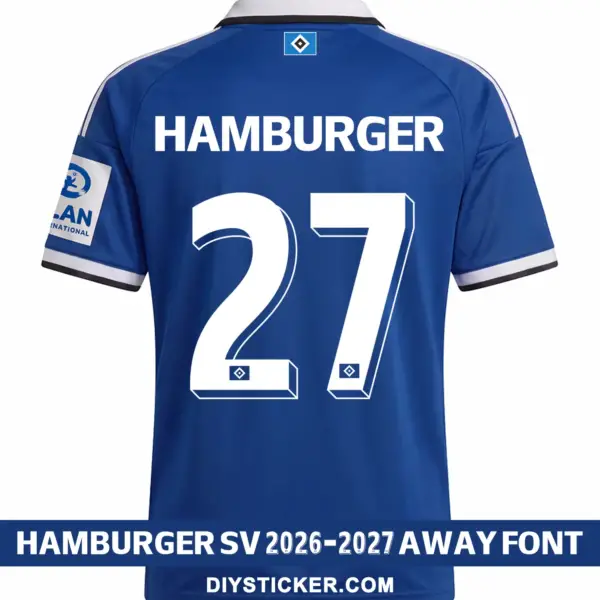
Recreate the striking retro design of Die Rothosen with this official kit typography set! If you need a high-precision Hamburger SV 2026-2027 away font download for apparel customization, this complete HSV 2026-27 away kit font digital bundle comes rendered in crisp solid white. Featuring clean, condensed sans-serif lettering alongside dynamic 3D bevel-extruded squad numbers with embedded diamond club crests at the base, it is the ultimate custom jersey printing font Hamburger SV option for garment decorators and printing professionals.
Package Includes:
-
Installable Desktop Font Files:
.TTF&.OTFformats (includes Hamburger SV TTF font) -
Fully Scalable Vector Assets:
.AI,.CDR, and.PDFlayers -
Complete uppercase alphabet, Hamburger SV jersey numbers vector, and specific diacritic accents (including
Æ,Ø,Š,Ç,Ñ).
Fully optimized for instant digital download, commercial vinyl cutters, and garment heat press production.
Elevate Your Kit Customization with the Hamburger SV 2026-2027 Away Font
Upgrade your custom sports apparel catalog with the official match-day away kit typography for Hamburger SV! This digital asset pack provides a complete Hamburger SV 2026-2027 away font download tailored for German football league and cup match customization. Featuring bold, high-legibility uppercase nameplate lettering (HAMBURGER, HAMBURGER SV) and impressive 3D block-style numbers with right-side drop bevel lines and the iconic diamond HSV badge embedded at the bottom of each digit, this layout creates maximum visual impact against royal blue away shirt fabrics.
Whether you are preparing a clean HSV away jersey font vector or seeking an editable Hamburger SV 2026-2027 font cdr download for production plotters, our vector assets match the precise design standards of the authentic HSV 2026-27 away kit font.
Cross-Platform Compatibility for Professional Printers
To ensure a seamless fit into your print shop or design studio workflow, this typography package is distributed across multiple standard formats:
-
Installable TrueType & OpenType (.TTF & .OTF): Simply install the Hamburger SV TTF font directly onto your Mac or Windows OS to dynamically type out custom player names in design platforms like Adobe Photoshop or Silhouette Studio.
-
Scalable Vector Layouts (.AI & .PDF): Infinite scalability ensures perfect edge quality at any scale. Best for adjusting vector path masks or managing full-back shirt dye sublimation graphics.
-
CorelDRAW Vector Graphics (.CDR): Pre-cleaned Hamburger SV 2026-2027 font cdr download optimized with precise line nodes to ensure glitch-free execution on commercial vinyl cutting tables, heat transfer plotters, and garment printers.
Comprehensive Character Mapping
Your instant digital download includes a complete alphanumeric asset set configured to exact kit specifications:
-
A-Z Uppercase Alphabet: Heavy, condensed sans-serif letterforms engineered for maximum clarity across high-back player nameplates and club headers.
-
0-9 3D Bevel Squad Numbers: Solid white numeric glyphs styled with dimensional right-side 3D bevel outlines and the official Hamburger SV diamond logo at the bottom (supplied as Hamburger SV jersey numbers vector).
-
Special Accents & Diacritics: Complete set of punctuation marks and international accents (
Á,Ć,Ç,É,Í,Ñ,Ö,Ř,Š,Ú,Æ,Ø, etc.) to accurately produce authentic player transfers using this custom jersey printing font Hamburger SV package.
Frequently Asked Questions (FAQ)
What software do I need to open the vector files?
The vector .AI, .CDR, and .PDF files—including the HSV away jersey font vector assets—can be opened and edited with any professional vector graphic applications, including Adobe Illustrator, CorelDRAW, and Inkscape. You can explore more German club typography in our Hamburger SV Font Category or browse all 2. Bundesliga & Bundesliga Kit Fonts.
Can I use this font on a Cricut or Silhouette cutter?
Yes! You can import the Hamburger SV jersey numbers vector files directly into Cricut Design Space, Silhouette Studio Designer Edition, or other vinyl plotting software to cut custom vinyl nameplates immediately. For official club news and match schedules, visit the official Hamburger SV Website.
How do I access my files after checking out?
Our store runs on a high-performance WooCommerce framework. Once you complete your Hamburger SV 2026-2027 away font download, your secure download link to the zip archive will be instantly generated on your screen at the checkout page and sent directly to your email address.
Nature of Digital Products
Due to the nature of digital goods (fonts and vector files), products are deemed “used” after download or opening. Therefore, all sales are final and non-refundable once the download link has been accessed.
By completing your purchase on PlayerFont.com, you acknowledge and agree to this policy.
Download Guide & Technical Support
How to Access Your Downloads
Once your payment is successfully processed, there are three ways to get your files:
- Instant Download: You will be automatically redirected to the “Order Received” page. Click the file name under the Download column to start saving.
- Email Confirmation: An automated email containing your download links will be sent to your registered email address. (Please check your Junk/Spam folder if you don’t see it).
- My Account: You can log in to your Account at any time, navigate to Downloads, and re-download any of your previous purchases.
Understanding Our File Formats
We provide professional-grade files to ensure the highest quality for your kits:
- Font Files (.TTF / .OTF):
- Standard installable fonts for Windows and Mac.
- Best for typing names and numbers in software like Word, Photoshop, or Illustrator.
- Vector Files (.CDR / .AI / .PDF):
- High-fidelity graphics that can be scaled to any size without losing quality.
- Includes full alphabet/number sets and intricate club logo details.
- Requires design software such as CorelDraw, Adobe Illustrator, or Photoshop.
How to Install & Use
- Installing Fonts: Right-click the
.ttfor.otffile and select “Install” (Windows) or double-click and select “Install Font” (Mac). - Opening Vectors: Right-click the
.cdror.aifile and choose “Open With” your preferred design software. - Note: If files are delivered in a
.ZIPor.RARfolder, please extract them using WinRAR or 7-Zip before attempting to install.
How to Request Assistance
If you encounter any problems with your order, please contact us immediately after purchase, and we will reply within 24 hours:
- Email: [email protected]
- Required Info: Please include your Order ID and a detailed description (or screenshot) of the issue.
Only logged in customers who have purchased this product may leave a review.
Reviews
There are no reviews yet.